Showing posts with label usability. Show all posts

Friday, November 20, 2009

The best restaurant site I've seen in a long time

I live not too far from a little pizza place called Emilio's. The other day I was looking through the handful of delivery menus I have and realized I didn't have one for Emilio's, so I figured I'd check online to see what they had.

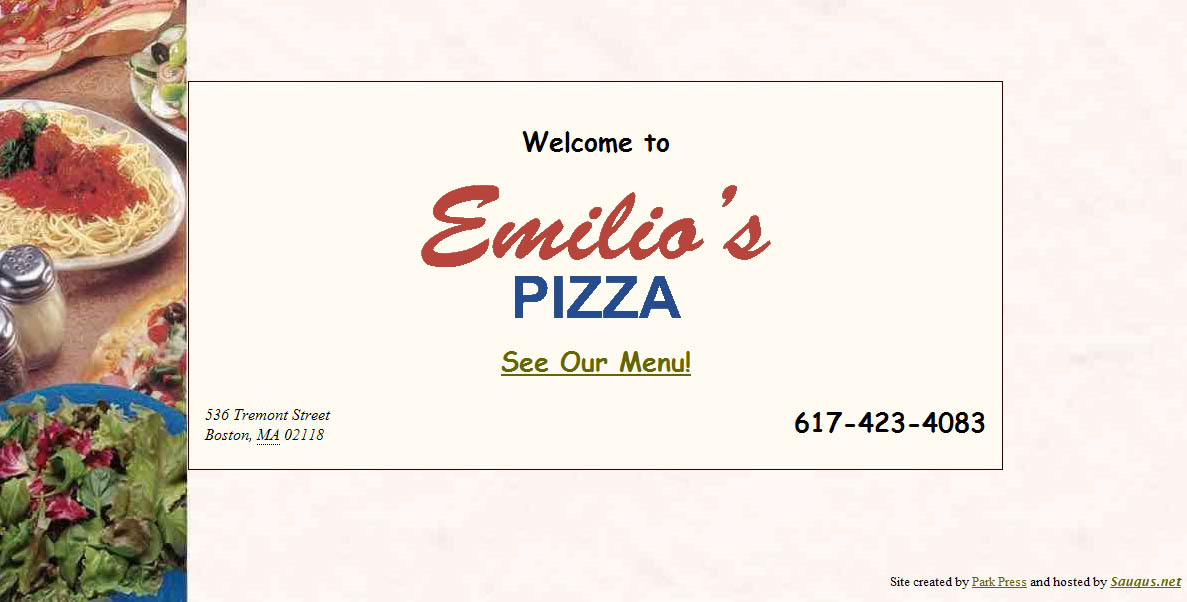
It took a few clicks to find their site (Google didn't surface it to the top like I'd hope), but once I did, I practically jumped up and down for joy. This one page is their whole website:


(Click to enlarge it, or just visit it here: www.emiliospizzaboston.com)

Okay, so, obviously this is not the prettiest website, but from a usability standpoint I was so happy to see an eatery get it right for once. There are pretty much three main reasons why you'd want to visit a delivery restaurant's website:

-What's on their menu? (And how much does it cost?)
-Where are they located?
-What's the phone number to place an order? (Or for fancier restaurants, to make a reservation)

What does the site for Emilio's offer? A direct link to the menu, their address, and their phone number in large text. No marketing gobbledygook statement from the owner. No pages about atmosphere. No unintuitive naming conventions (everyone knows the word "Menu," so calling it "Food" or "Cuisine" or something cutesy like "Tasty Nibbles" just ends up being confusing).

And furthermore, finding the menu didn't require me to click a location, then click a time of day (brunch, dinner, etc.), then click further into another sub-set of pages for "appetizers," "entrees," etc. I just got the whole menu right away, which is exactly what I wanted.

There are definitely more things the site could offer that would be helpful - hours, a link to a map next to the address, maybe a picture or two of the place (and if it was a fancier restaurant, probably information about reservations and maybe some press reviews), but the essentials were right there. It could also certainly be more visually appealing, but the fact is I found exactly what I was looking for within a split second of landing on the site, which is worth so much more than looking pretty.

Wednesday, October 21, 2009

Progressive disclosure: making decisions easier and more satisfying

I'm not sure if I've directly used the term on this blog before, but the concept of "progressive disclosure" is (in my opinion) a very important part of good design for any website or application. A good design will help the user find what they're looking for easily. Some people interpret this as meaning you should present up-front every possible piece of information they may need or want. In reality this just confuses the user. Imagine if, when you landed on Amazon's website, you were given a full list of every single product with full product description all on the home page. It would be completely unwieldy and almost impossible to find what you really want. Does "everything up-front" still sound like a good plan?

Progressive disclosure tells you that the best way to get people the information they want is to provide just enough at any given point to help their get to their desired result. To continue with the Amazon example, let's say you wanted to buy a Samsung HDTV. In our "up-front" example, you'd have to scan through an unwieldy page with millions of products to find what you want. Instead, progressive disclosure lets us get the shopper to Samsung TVs by clicking through a hierarchy. "Electronics," then "Televisions & Video," then "Samsung" is highlighted as a brand.

Furthermore, when you land on the Samsung page, you don't just see a text list of products or a full spec sheet for each product. You see each product with its name, an image, its price, and its consumer star rating. You're not given the full list of specs and item description for each item, but you're given extremely quick glances at three major pieces of information - aesthetics, price, and quality - which can then help you narrow down to the selection you want.

There are a lot of other ways of using progressive disclosure that aren't just hierarchical. It is helpful also in stepped processes, such as a shopping cart checkout (often you'll see steps shown, such as "Choose Payment Method" and "Enter Shipping Address," with your current step indicated). This lets the user know what's coming next and how long the process is.

You can also use the concept for things like optional features, such as when you are uploading a photo to a site. You may just want to put the photo up and leave it at that. Or maybe you want to add a caption, or tag people in the photo, or edit the photo, or assign it to an album. Having all these options shown up-front can be overwhelming, particularly to the user who just wants to put a photo up right away, a better method would be to make the most commonly used options visible and then hide some of the less-often used features behind a tab or link called "Customize" or "Edit" or something similar.

If you are already in the user experience field, this is probably nothing new. But it seems a lot of clients are frequently unaware of or even fearful of the concept. "I have this great [product/event/etc.] with all these amazing features and aspects to it, I want people to get excited and know all about how awesome it is! Why wouldn't I tell them all about it as soon as I can?"

The answer is that it doesn't help you if you overwhelm or turn off your potential audience. The above quote comes from a perspective of what the company/organization wants, not what the customer does. What your customers probably want to do is figure out what they are interested in, and then learn more about it. (How would you feel if the moment you walked into a car dealership, the dealer gave you a stack of spec sheets and owner's manuals for every car on the lot before you'd even looked at one? Wouldn't you rather find some cars that interest you and then get ask for more information?)

On any given page of a website, ask what the purpose of the page is and why the visitor may be there. Is it a list of products? They are probably there because they are trying to decide or find a product they want. Provide just enough information to get them to a good match, and then on that product's page give them the full run-down.

There are a lot of adjacent concepts that are relevant as well. "Information scent" is the practice of making sure links are providing just enough information to make the user feel like they are on the right track. And the "paradox of choice" is a concept that it is typically much easier, and much more satisfying, to make a choice from among a handful of options than hundreds of options. You could show 512 choices on one page, or you could add a measly 2 clicks to the process by placing a couple hierarchical categoies of 8 options each, giving your customer a much happier path to their goal.

Don't be afraid that you are going to lose a customer by making them click a few times to find what they're looking for. In reality, you are creating an easier and more satisfying route to guide them.

Monday, August 10, 2009

Offer an answer before the question gets asked


I'm going to give Bank of America a thumbs up and a thumbs down for two recent changes that raised my curiosity.

First, the positive. Bank of America (and a few other accounting/banking sites I've seen) seem to be switching to sign-in process that involves entering your username on one screen, and then your password on the next screen, rather than doing both at once. I don't know the research behind this, but my assumption is that this must be a more secure way of managing the login.

However, the first time I noticed that I wasn't being asked for a password, I got concerned. Did that mean that now someone only needed my username to access my account? It raised an alarm. However, right below the username field I noticed a link that said "Where do I enter my passcode?" Even without clicking the link, my concerns were relieved, because it was clear just by providing the link that I would, indeed, enter my passcode at some point to sign in. This is an example of smartly predicting a user's question and providing an answer without them having to ask. It saves the company time and money by reducing customer service requests, and it reinforces the user's confidence by being transparent and anticipating their questions.

Now the negative. I recently deposited a somewhat large check in my account. The pending deposit showed up immediately on my online banking. A few days later, however, a negative "deposit hold" for a slightly different amount appeared. Had it been the identical amount to my deposit I would have been less worried, but the fact that it was a different number, and that it was showing as a separate debit to my account rather than just a note on my original deposit, had me concerned that someone had somehow erroneously withdrawn that money from my account. There was no additional information, and even a search through customer support gave no explanation of a "deposit hold." I suspected things were probably fine and it was just an odd line-item while waiting for my deposit to clear, but to be sure I sent a message to customer service. They eventually confirmed that it was just a note until my deposit fully cleared and not to be worried.

However, they missed two key opportunities to provide information in advance, left a customer worried for a few hours, and ended up expending the time/cost involved in responding to an individual customer request. Had they included a clearer note with the "deposit hold," or even at least had an easily searchable answer in their customer support, they would have saved money and prevented any cause for concern.

I've seen similar examples of anticipating questions/concerns online, such as ING Direct adding a simple disclaimer to accompany a slight site redesign: "We gave our site a minor facelift. So if you notice anything different after you sign in, don't freak out. You're in the right place." Another smart move.

Anytime you are designing for the web, it's smart to brainstorm what questions your users might have, and to make sure the answers are provided or easily findable in advance. It's a win-win addition.

Monday, June 29, 2009

Typical can be good

Anyone working in a creative field will feel, from time to time, a little bored. It may feel like you've done the same thing before, and it feels like you're going through the motions. "This just feels so typical." So you try to shake things up by doing things differently, by starting from scratch, deliberately avoiding the way you've done things before.

That's good, right?

Well... not necessarily, particularly in web design.

While creative people may get bored, most people -- your consumers -- tend to resist change. Change is uncomfortable and unexpected. We operate on muscle memory a lot -- most web visitors know to click a logo for the home page. Most people know how tabs work. Most people understand a dropdown menu.

When you start changing those fundamentals, you're forcing people to learn something new, you're breaking well-entrenched habits, and you are putting your visitor in a position of unfamiliarity.

You can try to push past the typical in many aspects of design, just don't forget that the visitor is probably coming to your site to get something done, and they will accomplish that better if, at least at the interaction level, the design follows standards they are familiar with and have used before. Typical is often actually the best way to go.

Monday, April 13, 2009

The road sign metaphor


I've mentioned before how I think road and highway signs are a really interesting example of usability in action -- they have to be extremely clear, concise, and informative, and it is literally a matter of life or death in some cases (consider a world without "stop" signs).

I've begun using them as a metaphor for web design in the hopes of making it easier for clients to get in the mindset of their site visitors. We'd all like to believe that people coming to our website are deeply interested in our materials and want to read everything we have to say about them. Unfortunately, it's much more accurate to think of your site visitors as ruthless hunters with non-existent attention spans who are scanning for relevant content rapidly, and are willing to toss you aside if they don't see what they want in 2-3 seconds (note, that 2-3 seconds is actually borne out in testing -- that's about how much time you have before someone hits the back button and leaves your site altogether if they don't see what they want).

So that's all well and good to get that in your head -- your visitors want everything fast and easy, and want to do as little reading as possible -- but I think you need to add a little more to the equation in order to figure out how to deliver that content.

That's where road signs come into play.

When you are driving down a highway at 65 MPH, it's generally not that hard to read road signs. They typically do simple things like list the name of a place with an arrow, or they indicate with symbols and short words whether there is food, gas, lodging, or other amenities available at this exit. A road sign wouldn't say "Turn right at the next exit if you're heading toward the greater metropolitan Toledo area, where we have a number of fine hotels and dining options for the whole family." It might simply say "Toledo" with an arrow, as well as "FOOD" and "LODGING" icons. Those thirty words have been boiled down to three words and an arrow. Was any valuable information really lost? And furthermore, if you were flying down the highway, would you have even gotten past the first few words before the sign was gone behind you?

This is a good way to think as you construct your site, particularly when it comes to navigation and basic site structure. You want to pick "content-heavy" words -- typically short words that clearly indicate the content they will lead to. And just as a signpost with 25 signs is going to be harder to parse than one with 5 signs, you want to keep the number of options to a minimum.

This is not to say that you should avoid writing sentences at all -- it's important to keep prose available, but make sure it's where it counts. You don't need to describe in detail how great your parking garage is, but you do need to provide directions that tell you how to get there. Conversely, if someone is trying to pick your next book to buy online, a simple title, author, star rating, and genre is not going to be enough -- a brief prose description of the plot, potentially with quotes from reviewers, is probably going to do a lot more to sell the book than just providing the bare bones. That said, providing a quick look at the genre and rating information on a previous page may be all you need in terms of navigation to get that visitor to the full product page.

If you're not sure how to set up the text and navigation for your site, it may be helpful to stop and thinking of your visitor cruising down the freeway, looking for a particular destination. What would they be able to quickly read on a road sign that would make them turn in your direction?

Tuesday, March 10, 2009

Trust and faith in design

It's a cliche to make fun of older generations and their discomfort with technology, but that stereotypical technophobia is really just an extreme version of something all of us probably feel at some point or another: a lack of trust and faith in the system we are using.

What does this button do?
I remember having someone ask me, "What do I do to submit the form? Do I press the submit button?" The answer, to most of us, is "yes, duh." But what if the question is less clear? Navigational terms don't match what you thought you'd find. Something you thought was a free trial asks for your credit card and doesn't explain why. A link that seemed obvious takes you to a completely unexpected page or site. In each case, the design is playing fast and loose with the user's trust and faith, and as a result, is probably failing the user's needs.

Anticipate the next step
Good design anticipates what the user will want. On your homepage, offer links to the things your visitors most likely will want. Look at the search terms people use to find things on your site, and make sure your navigational terms match them. Whenever you ask a user for information, explain why you want it and how it will be used.

Explain yourself
One place that I frequently see abused is the "contact us" page -- many sites will ask for name, address, phone number, email, sometimes even fax number and company, and in worst-case scenarios, they'll even tack on some "survey" type questions -- even if all you wanted to do was maybe email them to ask about the release date of an upcoming product. In that scenario, literally the only piece of information the company actually needs is your email address. So why ask for the moon? Is it because your designer just used a "contact us" template and didn't really think about what that means for the user? Is it because you are adding me to a database you are going to sell to third parties? And even if all you do ask for is my email address, will you start sending me unwanted email newsletters without asking? Tell the user up front, and let them make the informed decision. (Even better, in this scenario, you could save the user and yourself time by having just clearly listed the product release date on your site in the first place.)

Expect questions, and provide answers
One thing I try to do when starting any project is just write down a list of questions I think a user/visitor may have, based on the type of site/product and the customer base. I try not to get overly specific but the questions should not just be the broad ones either -- for example, on a shoe site, I wouldn't write out questions about a particular pair of shoes, but I might write out questions about broader types of shoes, or questions that might apply to any individual pair of shoes.

Prioritize and group logically
From there, I try to group the questions logically, and see if they align to particular terms. If possible, prioritize the questions as well, and make it easier to find the answers to those more essential questions. This is also where some statistical data can come in handy -- search terms used, frequency of visits to particular areas of a site, volume of support emails/calls about particular topics. Maybe half the visitors to your site are just trying to find your address, and already know all about your product/service. You could have a beautiful, highly usable presentation of your product line, but if that address is hard to find, you are failing half your audience from the start.

I've found that structuring a website around this is a good way to meet user's needs, and a lot of this work can inform other decisions down the line, and make it easier to work in changes/new ideas -- just follow a mini-version of these steps (asking questions, grouping them, working out logical answers) and see if your architecture already accommodates these changes or if you need to restructure.

By anticipating everything the user will want, and providing easy answers to key questions and presenting them at logical points, you build that trust and faith. You're more likely to have a happy customer, and you reduce anxiety.

Wednesday, March 4, 2009

Usability Case Study: Comcast


I've heard a lot of horror stories about Comcast -- terrible customer service, too expensive, half-assed installations that sometimes end up destroying walls -- but when I moved this past weekend into a new apartment in Boston, I had to say goodbye to RCN and sign up with Comcast.

I try to keep an open mind, so I was willing to let the bad stories I'd heard recede, and look at my Comcast experience with out prejudging. Some of the experience was bad, some was good. Overall, for Comcast, this can serve as a case study in how they could improve their sign up process.

1. Signing up online
The first thing I did was visit the Comcast website and try to put together the package I wanted. We needed cable and internet, but no phone, and they did have a bundle for those two things. But they only had ONE bundle -- oddly enough, with the most basic cable offering they have, which excluded a few too many channels for my liking. When I tried to build my own bundle with the next level of cable, any bundle savings were erased, and there was no option to upgrade the basic bundle. Here I was, a customer wanting to spend MORE than the basic bundle offered, but the online system offered no way to do this. I gave up.
Verdict: FAIL
How to fix it: System should genuinely show all options, and make it easier to customize your package.

2. Signing up by phone automated prompts
Defeated by their website, I decided to just call to set it up. The very first thing that comes up in their automated prompt is "Enter the phone number where you would like service." This is a problem on many levels. First, Comcast offers phone service, so you could conceivably NOT have a phone number yet for the place you want to have it installed. Second, and here's what applies in my case, I am a cell-only person and do not have or want a landline. So the place where I want service has no phone number. Hoping to get to a prompt that makes more sense, I hit #. It asks me for my number again, and I hit # again hoping I'll get an operator or something. Instead it reads me back the phone number of the line I am calling on, assuming it is where I want service. Since I am calling from a landline at work, this is definitely not the number I want, so I hit a series of other buttons hoping to get out of installing cable at my workplace. Eventually, I somehow get a live person.
Verdict: FAIL
How to fix it: I suspect this may be the case, but a simple change in language could go the distance -- "Enter the phone number you would like to use for your contact information. If you are ordering phone service as part of your package, press *." This addresses both problem scenarios -- you don't have a landline, or you are adding a new landline.

3. Signing up by phone with a representative
Once I finally got a representative, which didn't take very long (no 30 minute wait for me), the process actually went quite smoothly. The man was helpful, understood exactly what I was asking for, explained the pricing and the promotional period, set up installation, it was a breeze. The only thing I realized after the call was that he had never taken my email address, which would've been nice so I could've gotten some email confirmation. But, not a big deal.
Verdict: SUCCESS

4. Installation
The installation was supposed to happen between 11am-1pm, and just as scheduled they showed up just after 11am, even though there was a huge snowstorm. They installed everything quickly, and were very nice -- they even took my roommate's old cable box with them to save him the return hassle.
Verdict: SUCCESS

5. Setting up internet
The one thing I had to set up on my own was the internet. They brought the modem but I had to activate it. Which would've been a breeze, except the first thing the system asks for is your account number. Since I had never been asked for my email address, I had no email record with that information. I looked through the documents the installers brought, and nothing had any personalized information -- no account number there either. I had never been given my account number! And the prompts offered no "don't have your account number?" prompt like many online services offer for people in my shoes. I had to call to get it, and this time I did have to wait about 10+ minutes on the phone to get a representative. Fortunately they gave me my number quickly, and then I was able to complete the setup.
Verdict: MIXED
How to fix it: Installation should come with some sort of confirmation sheet or other personalized document including your account number. But ideally, the internet activation should offer a "don't have your account number?" link that lets you enter in other information (SSN, phone number, address, etc.).

6. Ordering TiVo service on the website
Once I got everything set up, I tried to hook up my old TiVo box and realized that my new fancy HD setup did not work with my old school TiVo -- and the TiVo couldn't even communicate with the cable box to change channels, making it useless completely. I had seen billboards around town advertising that Comcast had partnered with TiVo to offer that service. Since I hate typical cable DVRs, I thought this would be a great alternative. I go online to the Comcast TiVo site, and it asks me for my zip code to check availability. Success! It is available locally (which makes sense, given the billboards). Now it's redirecting me to the order page, and... "This package or service is no longer available." What? In fact I can't find anything on the site to actually order the service. Which I know they are offering.
Verdict: FAIL
How to fix it: See #1. Don't tell me you have a service and then don't let me sign up for it. Get your system up to date, Comcast! Furthermore, include pricing information up front -- the page for TiVo did not include this.

7. Ordering TiVo via live chat
Just to try one more avenue of communication, I decide to use the live chat function rather than waiting on hold for a phone representative. No one is immediately available on the chat, but it does tell me what number I am in the queue, which is nice. It takes about 5-10 minutes for someone to show up, but since I am online I am able to do other things so I don't mind the wait. The representative is very helpful, answers my questions quickly, and I am surprised to learn that to get TiVo HD I do not need to buy a box or even pay an expensive initial setup fee, and the monthly fee is actually less than I was paying on my old TiVo. A pleasant surprise. The installation is set up quickly, and I'm done.
Verdict: SUCCESS

Overall, I was impressed by the actual human interactions -- people were friendly, and although not every phone call/live chat was answered immediately, the waits weren't too terrible. As for the website, it proved almost completely useless. It did not show all the options available, and in the case of TiVo, didn't even show the service at all. Even worse was the automated phone system, which started of on such a wrong footing that I got worried I was going to accidentally set up something at the complete wrong location.

Now I am not someone who hates using websites and automated phone systems to complete transactions -- in fact I prefer it greatly. If I can set something up without having to talk to someone, I am happy, as it saves me time and I can do it whenever I want. And, as far as I know, it greatly reduces the cost to the company. One client I worked with once mentioned that it cost them $14 per call due to the costs of maintaining that system and paying for call representatives. It would be to Comcast's extreme benefit to improve their system. And considering they are a company offering internet service, it speaks quite poorly of them that they cannot even offer a successful online interface.

Now let's just see how billing goes...
Friday, February 13, 2009

The economy and usability fail each other... again.

In this story from CNN about the economic stimulus bill, there is a quote from a Republican which has a lot of validity to it:

Some representatives expressed frustration over how little time they had to read the 1,000-plus page bill.

"You can't be serious. This would be humorous if it wasn't so sad," said Rep. Tom Price, R-Georgia. "What's in it? Have you read it?"

I blogged before about how usability could improve the mortgage process, and I think it could stand to do a lot to improve how bills are handled as well. No doubt the fine print of bills are necessary, but, at some point you have to be realistic. No one has time to read 1,000 page bills. It would take, probably quite literally, a few days straight of reading to get through it, let alone fully digest and understand it.

And furthermore, it reduces transparency -- we do operate in a representative government where we don't expect average citizens to have the time (or inclination) to know everything about every bill, law, and regulation -- but sometimes it would be nice to know exactly what our reps are doing.

So why not have a straight up bulleted list up front of all the items contained within? It could look as simple as this, or even break down each section a little further:
  • $12 billion for street repairs (p. 193-195)
  • $27 billion for environmentally friendly fuels (p. 344-350)
  • $19 billion for school construction (p. 507-524)
  • And so on...
Of course, that may oversimplify things, but if you're fairly certain you're on board with street repairs, but not so sure about environmentally friendly fuels, you can focus on reading the fuels section.

This isn't about being too lazy to read, it's about realistically improving the decision-making process. Big long documents shouldn't be impressive -- clearly written and easy-to-understand documents should. If you have to have the former, the least you can do is provide the option of the latter.

(Note: I'm not making any commentary on whether or not I agree with the Republicans' stance on the stimulus bill, but I am more than willing to highlight a valid point!)

Friday, December 19, 2008

More on the overlap of politics and usability

In my last entry I mentioned how I feared getting too political. But despite that fear I'm going to soldier on. I've become borderline obsessed with the economy, and various approaches to handling it, and have constantly been thinking about the decisions I would think best were I in a position of power.

Full disclosure -- I have considered myself most closely connected to libertarianism, as I like the concept that we really should be free to do what we want without government intervention. But, and here's where usability kicks in -- we don't always *know* everything necessary to make the best choices.

There seems to be two sides to this -- either you say that it is up to you to educate yourself, and a bad choice is your own fault, but you are free to make it, or you say that people should be prevented from making such bad choices through regulation and laws that take bad options off the table.

I've come to appreciate the concept of "soft paternalism" or "libertarian paternalism," which basically says, you are free to make whatever choice you want, but we are going to try our best to steer you in the right direction.

This is almost the essence of usability in a nutshell. Make it easy for people to make choices that will satisfy them. Emphasize the most common or most logical paths but provide alternate routes to get to other options if someone knows specifically what they already want. The wikipedia article I link above has a great description, with specific reference to "defaults" -- a concept that usability expert Jakob Nielsen has written about, stressing the importance of setting defaults wisely so they are set to the most likely beneficial setting.

Compare the two. Wikipedia, giving the example of setting your retirement contribution from your paycheck (emphasis mine in both quotes):
The asymmetry of soft paternalism can be seen in the case of a policy which raises default rates. Those who are making an informed deliberate choice to put aside zero percent of their income in tax deferred savings still have this option, but those who were not saving simply out of inertia or due to procrastination are helped by higher default contribution rates.
Now read Jakob Nielsen:
Users rely on defaults in many other areas of user interface design. For example, they rarely utilize fancy customization features, making it important to optimize the default user experience, since that's what most users stick to. ... By educating and guiding users, default values help reduce errors. It's therefore important to select helpful defaults, rather than those based on the first letter of the alphabet or whatever the first option on your original list happened to be.
Imagine for a moment that at all aspects of our lives, rather than starting from "zero" on any new thing, we started anything by being told right off the bat what the most common or most beneficial starting place was, but were given the option to change that in any way we see fit. Smart businesses already apply this in many areas, essentially putting Nielsen's usability advice in effect. But I think the applications of such a concept are much more far-reaching.

I don't know that this means that "soft paternalism" and "good usability" are identical, or that the concepts therein can be applied universally, but I was struck at the similarities between the two. At the very least, it shows that you can successfully apply similar philosophies to different disciplines.

Wednesday, November 26, 2008

Could better usability save the economy?

Okay, maybe that headline is an overstatement, but I'd say usability is an overlooked component in saving the economy. Like any American who pays attention to current events, the economic downturn is at the forefront of my mind right now. And there is one area that has troubled me quite a bit -- the whole mortgage meltdown.

There are kind of two sides to the mortgage problem (ignoring for a moment the whole "credit swaps" thing -- which is a pretty big piece to ignore but just roll with me here): there are the individuals who bought homes they could not afford, and there are the lenders who signed off on mortgages they likely knew the buyer could not afford to repay.

Much has been made of the "predatory lenders" -- the system is set up such that a lot of the places granting the initial mortgages get a few years of high (or all) interest payments before passing the mortgage off to some larger firm for the remainder and letting them deal with the fallout of potential foreclosure. Ultimately, the initial lenders don't really care about whether or not the lendee can pay it all back -- they just want that initial burst of nearly pure-profit payments.

But what bothers me about this attack on "predatory lenders" is that pretty much any business out there seeks to increase profit, so why pick on lenders? It seems to be to be attaching some moral expectation to something that is amoral (not immoral, mind you). Paying for goods and services is a mutual exchange where each side gets something they want.

The consumer-minded side says this is unfair, but I think it's risky to remove any responsibility from the individual. If you sign a contract that requires you to pay a certain amount of money, it's ultimately your own fault if you end up unable to hold up your end of the bargain. Really, a foreclosure is the fault of the homeowner, not the lender -- even if the lender suspected you wouldn't be able to pay it back, if you have stated that you can and will pay things back, you're the one who's made the promise you can't keep.

Where this all breaks down is that not every lender is going to be explicit in terms of costs, not every homeowner is going to know to check all the fine print, and those two problems can feed off each other into a pretty dangerous spiral.

This is where usability comes into play. One of the tenets of good usability is that you don't blame the "user" if they have a problem. Even if everything to accomplish a task is there, if your users are failing to do it, then you have a problem with the presentation. You don't just say your users are stupid (because then you're both insulting your customers and losing business), you try to adjust things to make it clearer and easier to understand.

I am not familiar with the rules and regulations around signing a mortgage, but I am virtually certain the amount of paperwork involved would be confusing to even the savviest person. From a usability perspective, it's a nightmare. I have no doubt that people have signed contracts not realizing that the initial $800 a month payment is going to balloon to $2000, or that the total they pay for a $300,000 home is actually going to be something like a million dollars.

Imagine for a moment that regulations required that all major contracts have a one-page cover sheet that included clearly the monthly payment, how the monthly payment may change over time, the breakdown of interest and principal, and the total amount to be eventually paid. All of this in nice big fonts with a clear layout that is easy to read.

I fear getting too political in this blog, but I can't help but think that so many of the problems in our current economic crisis boil down to people making decisions without knowing all the information. And while many people think that the problem was a lack of regulating the kinds of decisions that could be made, I would say that the greater problem was not requiring full disclosure and clarity be provided before anyone makes any major transaction. Whether that is a potential homeowner or a potential investor, if there was a requirement of a crystal clear one-sheet explanation of the pending transaction in layman's terms, you may find fewer questionable decisions being made in the first place.

As an analogy, New York City recently began requiring chain restaurants to print calorie information next to meals. The caloric totals shocked people (some salads have more calories than a burger and fries!?), but those trying to eat healthy had full information at their disposal rather than uninformed guessing. Compare this regulation to some alternative legislation that may have required that restaurants stop serving high calorie dishes altogether. The former regulation puts the onus on the individual, but provides them with full disclosure in a clear manner. The other is the government deciding what's good for you, expecting that you won't make the good decision for yourself and taking options off the table. I'm sure some people would still prefer the latter, but I really think that letting people make their own choice, for good or bad, is better than trying to make it for them -- just make sure they know the consequences of their choices.

Usability is ultimately about providng clear information. If we can manage that, and let people make fully informed decisions, we can encourage responsibility without removing choice.

Monday, November 10, 2008

Designing for failure

It only takes going through a handful of creative projects to realize that virtually every tiny thing is done purposefully. Very little happens by accident, and because of this, one of my mini-pastimes is looking at common designs and trying to figure out how they came to be (or, in contrast, why antiquated designs went out of style). Last night I was pondering how the anthropomorphizing of food -- a smiley face on a popcorn box or a cup of soda -- became a successful marketing technique. And I've been wondering for months about the process that led to the creation of traffic signs -- perhaps the most vital instance of usability in action, as a failure to communicate properly could be fatal.

But I'd like to focus right now on the concept of designing for failure. Of course, an ideal system would make it virtually impossible for someone to fail, but even the most simplistic and clear designs are going to stump a few people, and sometimes failure can occur due to other complexities in the system. My shining example? Copy machines.


(Okay I know that's not a copy machine but at least it involves a cat.)

Jams in the copy machine are obscenely commonplace, as anyone who has worked in an office knows, and they can be extremely frustrating. But they're unavoidable; the mechanics of these machines are so complex that the smallest problems can trigger a jam. I imagine that early copying machines broke down so frequently that calling for a repairman became an untenable situation, and the "fix it yourself" process for un-jamming a copier became a standard for the industry. You know the drill, open the side of the machine, pull out tray 3a, take out the jammed paper from some spinny thingy labeled 5c, etc. It's annoying, but it usually works, and you can get back to copying. The time and cost savings of not having to call a repairman is well worth the minor inconvenience of having to fix it yourself.

This same concept can be applied to just about any design, including a website. You can have what you think is the most sensible site structure and design possible, with a big clearly labeled button for some key task, only to find that sometimes your visitors just miss it entirely or click the wrong thing or otherwise end up lost and confused.

The keys to anticipating error involve eliminating opportunities to make a mistake (ahem), and offering alternative paths to get to the desired result if the visitor misses or doesn't understand the primary path. While a lot of web visitors will resort to the back button and try again, you have to remember that the back button may be taking them off your site altogether. For example, let's say they search on Google for something in your industry and use the word "compare" -- this may take them to a page on your site which compares your various products. But if the visitor was looking for comparisons across a variety of brands, rather than just within one brand, the page won't be what they want, and they may end up at another site altogether. But if you have a prominent link that says "Compare to the Competition," well they just may click on that and stay with you on your site.

Other suggestions to keep visitors on the right path: use logical naming conventions (e.g., "About Us" is much more intuitive than something like "Our Way of Thinking"), provide alternative paths (e.g., include a search option, and highlight relevant contextual links on key pages, etc.), and remove anything that does not hold a lot of value to the user (a page full of marketing copy may show up high on search results but will likely not actually provide the hard info the user is looking for).

Plan for the copy jam. If you do, your visitor will be able to get back on track to find what they want rather than abandoning you entirely.

Monday, October 20, 2008

Cut cut cut!

For many people who have websites, this is a sad but almost undoubtedly true fact: No one wants to read what you have to say.

First, let me give a caveat - if you have a blog or some opinion-based or news-based site, chances are people that visit your site do actually want to read what you have to say. But, most sites do not fall into that category. Also, this is not to say that visitors won't read anything at all -- but all most visitors want to do is find a specific piece of information very quickly and move on. Nobody sets out looking for self-hyping or vague filler, and any amount of that present on your site is an obstacle to their goal.

What I've said in previous posts about being self-aware or maintaining objectivity applies strongly here -- do you read websites? When you search for something and find a relevant hit, do you explore a site, patiently sit through a flash intro, and read paragraphs of marketing copy? The answer is probably no. So why would you expect your visitors to do that?

I've seen cases where I get the distinct impression a client is afraid that not having a lot of pages and a lot of text will send a message to the visitor that there is a lack of substance there. This couldn't be further from the truth. A trim, efficient, streamlined site that is light on fluff but clear and direct on content will send a message that you know what you're talking about, you know what the visitor wants, and you don't waste time and energy on the superfluous. Probably the only commodity more valuable than money is time, and no one wants their time wasted.

So I'm going to listen to my own advice and keep this short. Some simple rules:
  • Be ruthless and be willing to edit - because your visitors are ruthless with the "back" button and will ditch your page in seconds if they don't see what they want right away.
  • Every piece of content you write needs to deliver vital information that the visitor wants to read, otherwise you need to get rid of it.
  • Be willing to delete entire pages if their content is unnecessary or so light it could easily be combined with other pages.
  • Don't be long-winded; write concisely.
  • And perhaps underpinning all of this: don't be emotionally attached to any of your content, or you'll cheat yourself out of making the best site for your visitors.

Monday, September 29, 2008

Why are the basics still so hard?

Last week I encountered a few situations where all I could think was, "why is this still so difficult?" In one case, someone who was incredibly tech savvy was having difficulty getting a TV to work with a particular attached device -- shouldn't this be easy by now? Why do we all still have four television remotes? Why is there such a confusing jumble of wires and inputs? Why haven't we figured this out yet? Virtually everyone (at least in the US) has a TV and at least one device attached to it -- a DVD player, a cable box, or maybe a TiVo, or AppleTV, or even a full home media system -- but these systems still seem designed from an engineer's perspective, not for the average Joe.

I don't know how to answer all those questions I posited there, but I'm hoping that we eventually reach a point where we start making a little more room for real world usability. I've heard (unfortunately I can't cite a statistic) that HDTVs are frequently returned because people think they're broken, when in reality it's because they haven't attached it to their cable connection correctly or they have not properly adjusted the settings, and if you mess all that up, the end picture often looks worse than old analog TV. But, how is an average person supposed to know that? And at what point do you get enough complaints and returns to actually go back to the design phase and say, "let's simplify this"?

A lot of designers thinks this means that people are stupid, and you have to oversimplify to the point of babying people. Let's snap out of that mindset, and instead try putting ourselves in someone else's shoes. Imagine some field you know nothing at all about, and now imagine an expert working on something that is ultimately meant for you, the "average" person. Wouldn't you want them to make it as clear and easy for you to understand as possible? So why balk at doing that in design?

Monday, August 25, 2008

Learning to be self-aware

Jumping off of a concept from my last post about common sense usability, one of the most important things a good designer (particularly in the usability field) needs to be is self-aware. In general, people are extremely un-self-aware. Concepts of time are often way off (anecdotally, I remember my mother, in 2007, referring to Princess Diana's death as having been "a couple years ago," when in fact it had been ten years), and we tend to conflate memories into events that either didn't happen or occurred in separate times and places.

This is particularly an issue when working on web design. Very few people stop to ask of themselves the kinds of questions that are absolutely vital for good design. Where does my eye go first? This can help you organize the layout via information hierarchy. Am I moving my mouse to follow my eye? This may suggest good places to have hover states. Do I quickly click from page to page until I find what I want or do I scan a page fully before making my first click? This could inform your approach to site navigation. How many seconds does it REALLY take for me before I get annoyed at not finding what I want? This may determine whether a long-loading Flash module or graphics-heavy page is worth the sacrifice in loading time it may cost.

As important as it is to do proper testing and remember that, as the designer, you are rarely the intended audience, and you certainly know far more about the site than the average visitor will, you can still glean a lot of information just by carefully noting your own reactions -- even reactions to sites that have nothing to do with the one you are working on.

This is also helpful for someone who is not in design, but may need to work with a designer on a project. Are you working at a small organization that needs a better website? You'll be better able to get a top-notch end product if you are able to articulate clearly what your needs are, and you'll be better able to stand up for good usability practices if you end up working with a designer who has a great eye but perhaps a poor sense of usability. Think about your own site. Are there places you (or your visitors) frequently go to on your site that are buried? Is valuable home page real estate being devoted to unsupported or barely visited portions of your site? What aspects of your own site or your competitors' sites frustrate you and what do you find pleasing?

Asking these questions and being aware of your emotional state (by which I mean, happy, annoyed, indifferent, etc.) while browsing can help you pinpoint the design aspects that work and those that don't. So next time you find yourself frustrated by a website, stop for a second and think about what exactly is bothering you, and maybe even write it down. Similarly, next time you enter a site and find the information you want right away, think about what they did right -- this is often just as important or more important than finding the negatives, and frequently we don't even notice when something is done right.

But even when trying these exercises, keep in mind that there will undoubtedly be things you are doing that you are not realizing. It may sharpen your instincts, but for any larger scale project, you'll still need to take that critical look and apply it to other users to truly find underlying patterns and problems.

Friday, August 22, 2008

Why isn't usability common sense?

One of the things that has always amazed me is just how many books there are out there about every imaginable web-related topic from programming to strategy to marketing. And of course, there are plenty of books about usability and all its related fields.

Let me emphasize for a moment that I'm talking about BOOKS -- big thick tomes, hundreds (sometimes thousands) of pages long. I can't entirely fathom why they are all necessary. How much can you really say on any of these topics? But, I recognize that there is obviously a market for these books and I'm sure many find them incredibly useful. On that end, I chalk it up to a difference of approach -- most of what I have learned has come from experience and small chunks of learning, but I can certainly appreciate that others learn in a different way.

But the one thing that strikes me is just how much of this knowledge, particularly when it comes to usability, should be common sense but isn't. Certain things require research to determine, and may not be entirely obvious. People scan web pages in an F pattern. The first two words of a list item should carry the informational weight (even if it means poor grammar). Most people find websites via search engines. None of those things are all that surprising, but they're not the kind of things you'd expect the average person to know off-hand.

But what about some of the other, more "obvious" aspects of usability? Tiny fonts are hard to read. Straightforward, descriptive language is easier to understand. Human beings are creatures of habit. All of these things seem like they should be self-evident -- the last of those three is even a common proverb. But take a look online. The web is rampant with sites that use extremely small type, writers bury their content in made-up jargon and unclear, confusing prose, and many designers view it as a personal challenge to always break from traditional designs and interfaces in favor of flashy, unexpected interactions.

If you asked a construction team to build a house, but told them it should have no windows, the door should be a round porthole the size of a hula hoop, and the ceilings should be 4 feet high, you'd be called crazy. But, technically, it would still be a "functional" house, and it would certainly get some attention. A lot of websites seem to fall into this category, often because they are old and poorly made just due to a lack of skill/investment, but some newer websites even fall into this trap, as high-end designers seek to create showy, "interesting" sites that draw in the eye but fail when it comes to actual interaction.

Is it that these common sense ideas aren't common sense after all? Is there an innate drive among designers to always push against commonly-held perceptions? The challenge of anyone with an eye on usability is to recognize that the desire to question the status quo is enormously valuable -- but the ability to look critically at your own "innovative" ideas and recognize when change is a negative is possibly even more beneficial, and is certainly undervalued.

Don't blindly accept "the way things are," but don't abandon common sense in the name of innovative design.